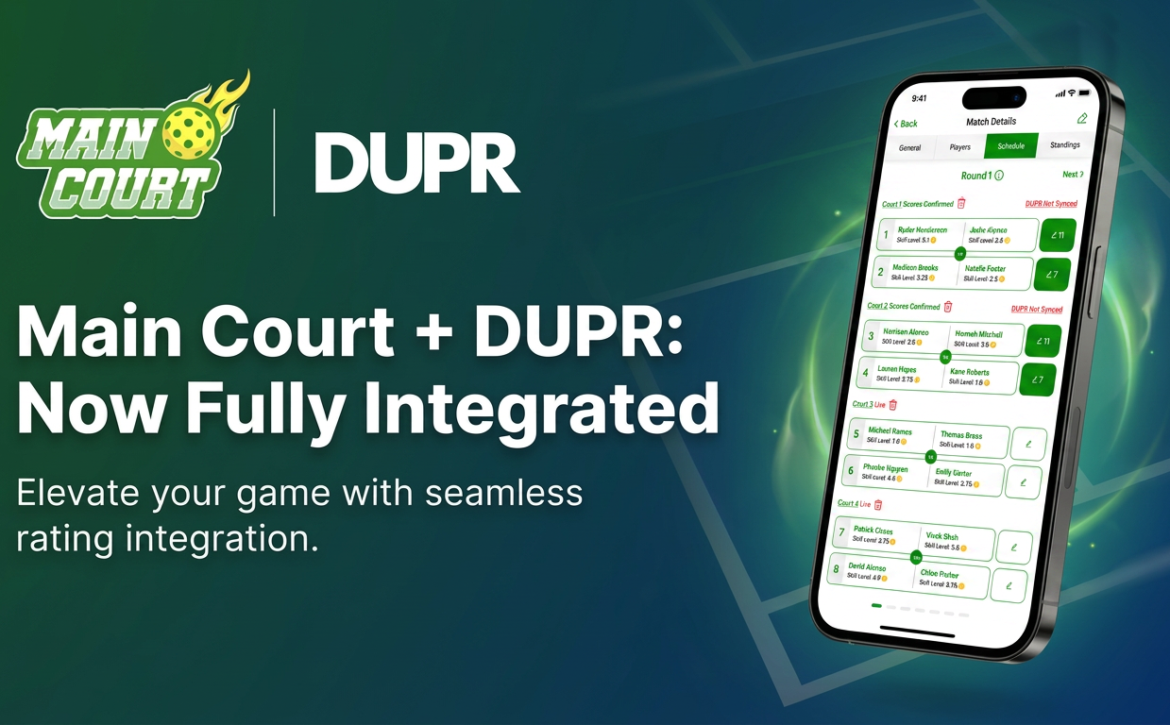
Main Court and DUPR launch a full integration — players can now see their DUPR rating inside Main Court, run DUPR-rated Round Robins, and automatically sync match scores to DUPR.
Maybe you just moved. Maybe you're new to the sport. Maybe your usual crew keeps flaking and you're tired of rebuilding a roster every Sunday morning. Either way, you need to find pickleball players near you, and if you're like most people, your first instinct was to join a Facebook group, type "anyone in [your city] want to play?", and wait. And wait.
Facebook Groups Were Built for Discussion. Not Discovery.
Facebook groups are forums. They are optimized for people talking to each other in a feed: sharing tips, posting memes, occasionally arguing about paddles. They are not optimized for finding a specific human within a few miles of you, who plays at your level, who is free Saturday at 9am, and who you can actually trust to show up. Nobody built them for that, and it shows every time you try to put together a game.
Yet that's how most rec players still try to find pickleball partners. Not because it works, but because nothing better existed in their head. Until they tried Main Court.
What "Finding Players" Looks Like in a Facebook Group
Here's the typical post in any "[Your City] Pickleball" Facebook group:
Posted in: San Diego Pickleball · 12,400 members
Hey everyone, just moved to North County, looking for 3.5 to 4.0 players. Free most evenings and weekends. DM me!
↳ Anna: I'm a solid 3.0, wanna come hit?
↳ Mike: Whereabouts in North County? I'm in Carlsbad
↳ Steve: I'm a 4.5 but happy to play down
↳ Kim: Are you free Saturday? My group needs a 4th
↳ Diana: What courts do you usually play at?
Seen by 847 · Useful replies: 1.
Sound familiar? You posted into a feed that shoved your request in front of thousands of people who don't match what you need, and the few who replied are strangers with no track record. That's not a community problem. That's a tool problem.
8 Ways Facebook Groups Fail You for Finding Pickleball Players
What you actually need
Facebook Groups
Main Court
Skill-level filter
✗ Everyone replies, levels guessed
✓ Main Court and DUPR skill-level filtered results
Verified rating with rating count
✗ "I'm a 4.0, trust me"
✓ Skill rating plus the number of players who rated them
Player recommendations
✗ Strangers with no signal
✓ Highly Recommended and All Star badges from past partners
Match history visible
✗ No history, no context
✓ See who they've played and how often
Distance from you
✗ City-wide feed
✓ Map and radius, sorted by distance
Availability filter
✗ DM and ask, then wait
✓ Calendar-based, by day and time
Direct match request
✗ DM chain, maybe a game
✓ One tap, request, auto-confirm
Recurring partners
✗ Hope you bump into them
✓ Save players, get notified when they post a game
💡 Tip: Most of your "find a partner" misses come from skill mismatch. Take the free pickleball skill level assessment before you start searching so your results actually fit your game.
The Geography Problem with Facebook Groups
Facebook groups are organized by city ("San Diego Pickleball," "Austin Pickleball Community"), but the courts you'd actually drive to are within 5 to 10 miles of where you live. A city-wide group dumps everyone in the same feed. You're seeing posts from people 25 miles away and completely missing the player who lives three blocks over because they posted in a different group, or didn't post at all.
Main Court is map-based. When you open the app, you see open matches and active players sorted by distance from you. No "is Encinitas too far?" math. Just who's nearby and when they're free.
The Skill Level Guessing Game
Every Facebook pickleball group has the same problem: nobody is the level they say they are. A self-described "3.5" can be anywhere from a real 2.5 to a sandbagging 4.0. You can't filter the replies, you can't verify levels before agreeing to play, and the only way to find out is to show up and discover the mismatch in person, which usually means one of you has a bad game.
Main Court uses skill ratings (with DUPR integration) plus rating counts from other players. A 4.0 with 60 ratings tells you something fundamentally different from a 4.0 with two. Set your range, and only players who actually fit show up.
The Trust Problem: You're Playing With Strangers
The deeper issue with Facebook groups isn't just skill or distance. It's that you have zero signal about the human on the other side of the message. Their level is whatever they claim. Their reliability is unknowable. The only thing you've got before driving to a court is a name and maybe a profile picture.
Main Court puts trust signals on every player profile. Their skill rating shows how many other players have rated them. Recommendations from past partners show up directly as badges: Highly Recommended, Main Court All Star. And you can see their match history before you ever send a request: who they've played, how often, how recently. Fifty matches in the last six months tells you one story. Three matches and a long gap tells you another.
You don't have to show up and hope. The information is on the screen before you commit.
How to Find Pickleball Players Near You: The Right Way
Find people you'll actually want to play with again.
It's two taps on Main Court.
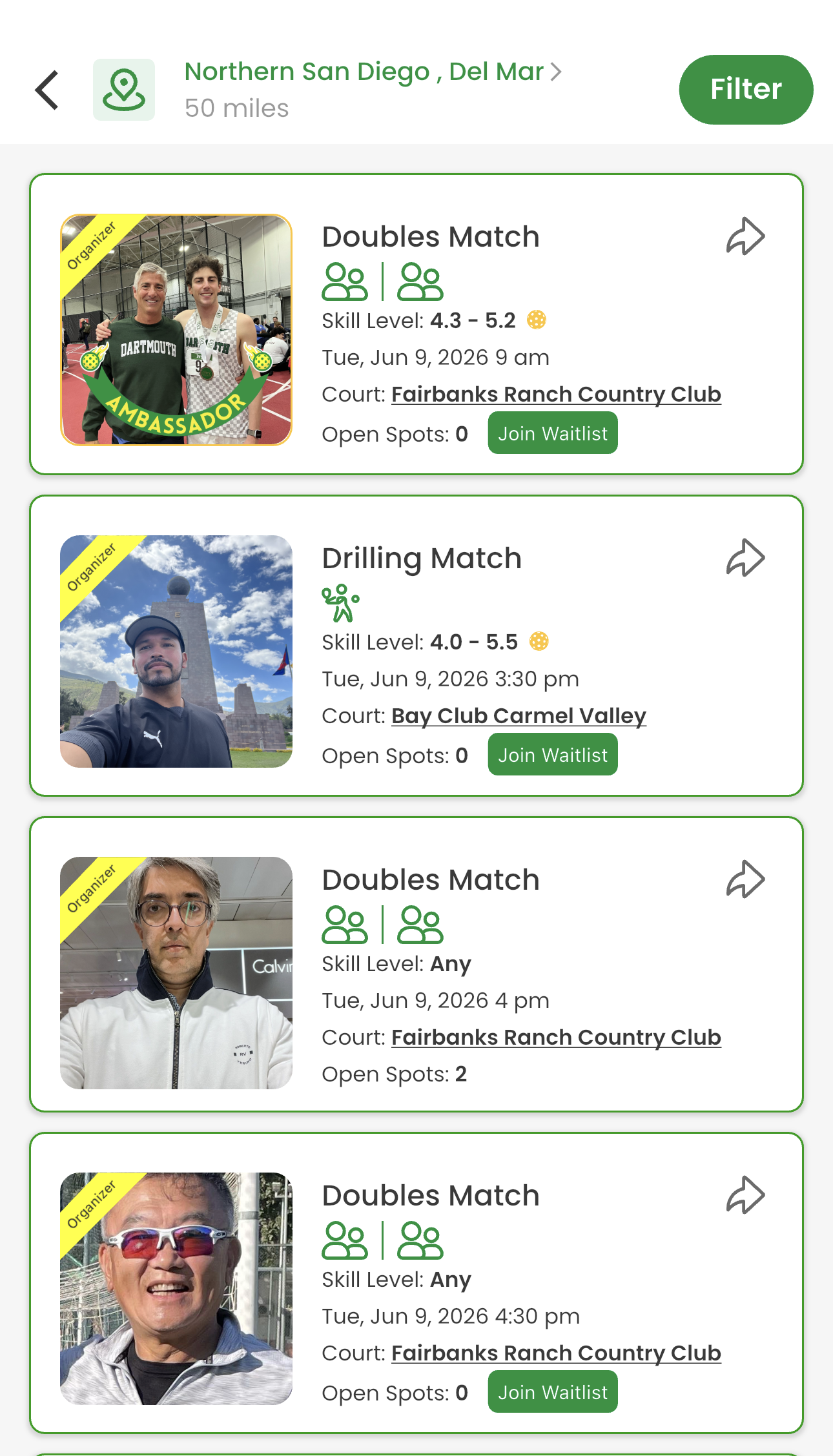
To find a game, open the app to the Open Matches feed. Set your location and radius (say, 50 miles around Del Mar), and you see every nearby match with its skill range, date, court, and open spots. Tap one that fits, request to join, and you're in. If it's full, hop on the waitlist and you get auto-promoted when someone drops.
Open Matches feed: skill range, court, date, spots left. Tap to join.
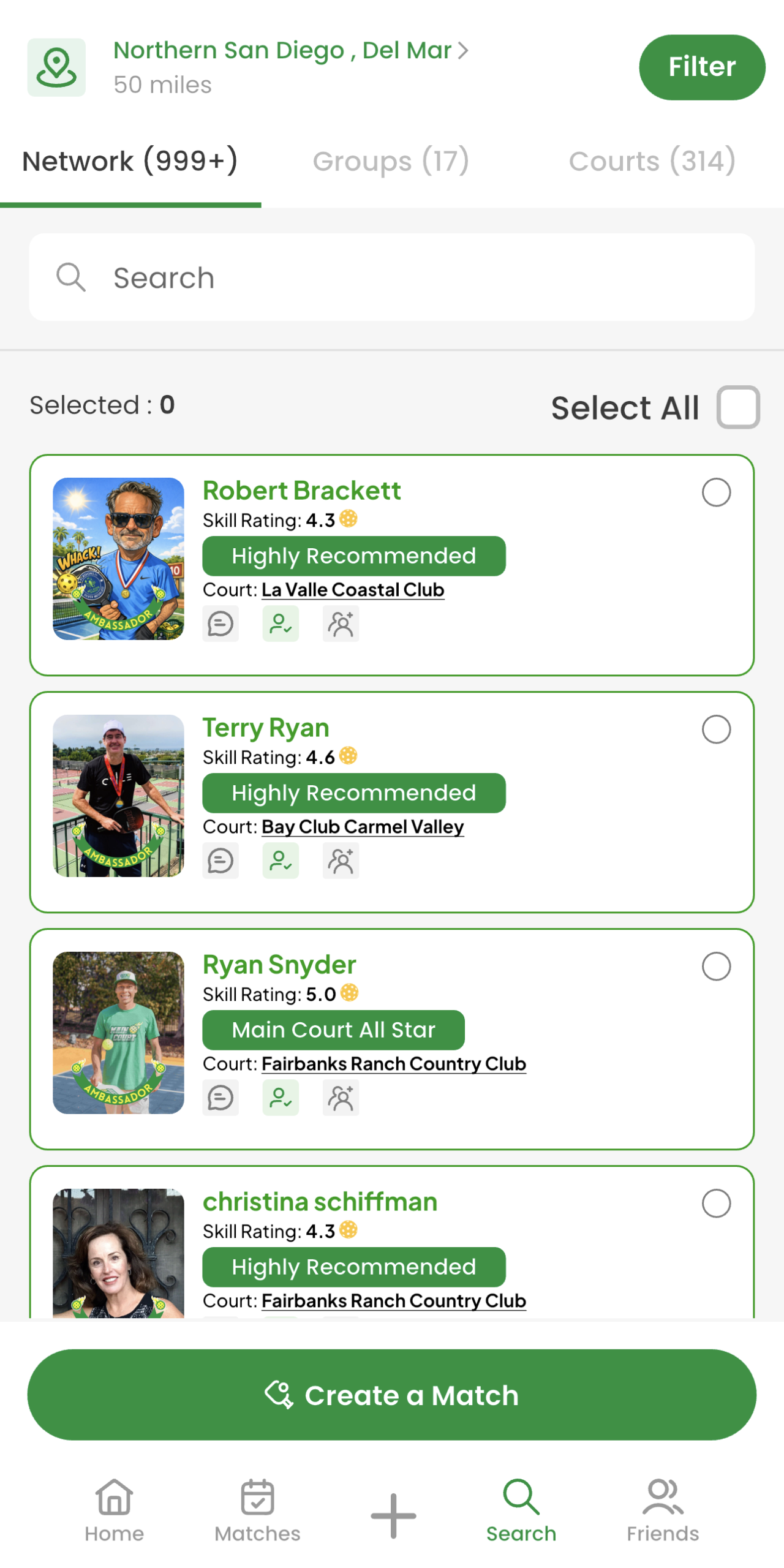
To find players, tap the Search button. You see your local network sorted by proximity, each card with their skill rating, recommendation status (Highly Recommended, Main Court All Star), and home court. Tap a player to see their full profile, recommendations, and match history before you ever send a request. Or hit Create a Match and invite the people you actually want to play with.
Search: local network with skill ratings, recommendation badges, and home courts.
That's it. No Facebook group. No DM chains. No "anyone playing Saturday?" posts shouted into the void. By the time you walk onto the court, you already know who you're playing.
Stop Looking for Pickleball Players in Facebook Groups
Find pickleball players near you, at your skill level, with the ratings and recommendations to back it up, in under a minute.
If you organize pickleball through a group chat — Facebook, WhatsApp, or SMS — you already know the drill. You post, you wait, you chase replies, you manage a cancellation at 7am, and by the time you've sorted it all out you've spent more energy on logistics than on actually playing. Your pickleball group chat was never built for this.
The Group Chat Was Built for Talking. Not Organizing.
Facebook groups, WhatsApp threads, and SMS chains are communication tools. They're good at sending messages. They are not good at managing RSVPs, tracking who's confirmed, filtering by skill level, handling waitlists, or sending reminders. Nobody built them for that — and it shows every time you try to pull a game together.
Yet this is how most recreational pickleball gets organized. Not because it works, but because nothing better existed. Until now.
What Actually Happens in a Pickleball Group Chat
Here's how a typical Wednesday game comes together in a WhatsApp or Facebook group:
Sound familiar? That's not a communication problem — it's a tool problem. You're using a chat app to do the job of a sports organizer platform.
8 Ways a Pickleball Group Chat Fails You
💡 Tip: Before your next game, check your actual pickleball skill level — it's the single biggest factor in whether a match is worth showing up for.
Facebook Groups Have a Skill Level Problem
Facebook groups have one specific failure that makes player matching nearly impossible: there's no skill filter. You post "looking for 4.0 players Saturday morning" and you get replies from everyone — 2.5s who think they're 4.0s, 5.0s who are bored, and people asking what court it's on.
The result is either an awkward conversation about turning people away, or you accept everyone and end up with a match that's a mess for half the players. Neither outcome builds the community you're trying to create.
Main Court lets you set a skill range when you create a match. Only players who qualify can see and request to join. No awkward conversations, no mismatched games.
WhatsApp and SMS Don't Scale Past 8 Players
WhatsApp and SMS threads work fine for a tight group of 6 friends who've played together for years. The moment you try to grow — add new players, manage a rotating roster, run a recurring game — it breaks down fast.
Messages stack up. Context gets lost. New players don't have the history. And every week you're starting from scratch, re-explaining logistics that should be automatic.
Organizers running games on Main Court report spending a fraction of the time on logistics compared to group chats — because the platform handles the repetitive parts: invites, confirmations, reminders, waitlists, and cancellation fills. The organizer shows up and plays.
What Organizing Pickleball Should Actually Look Like
Create a match in under 3 minutes. Set your skill range. Post it to your network or open it to the Main Court community. Players request to join, you approve. Reminders go out automatically. If someone cancels, the next person on the waitlist gets notified instantly.
You walk onto the court knowing exactly who's showing up, what level they play, and that they've been reminded twice. No chasing, no "who's still in?", no last-minute panic.
That's what organizing pickleball looks like when you're using the right tool for the job.